Live on MQL5 ★ 4.8/5.0 rating 100+ systems delivered One-time · from $99

Trade gold by the rules. Watch every trade first.

Blueprint is a complete XAUUSD system on Renko bricks: five strategies, confluence entries and built-in risk control in one product. Its matching indicator replays every trade the EA would take across your history — so you see exactly what it does before you risk a dollar.

One-time payment · Indicator $99 or the full EA + Indicator $499 · PDF guide included

463 trades / 14 days +12,238 pips net 63% win rate 5 strategies · one engine Renko 250 · XAUUSD +$1,196 at 0.01 lot From $99 · one-time
XAUUSD · Renko 250 · 14-day replay
The whole system, one chart

Every strategy, colour-coded

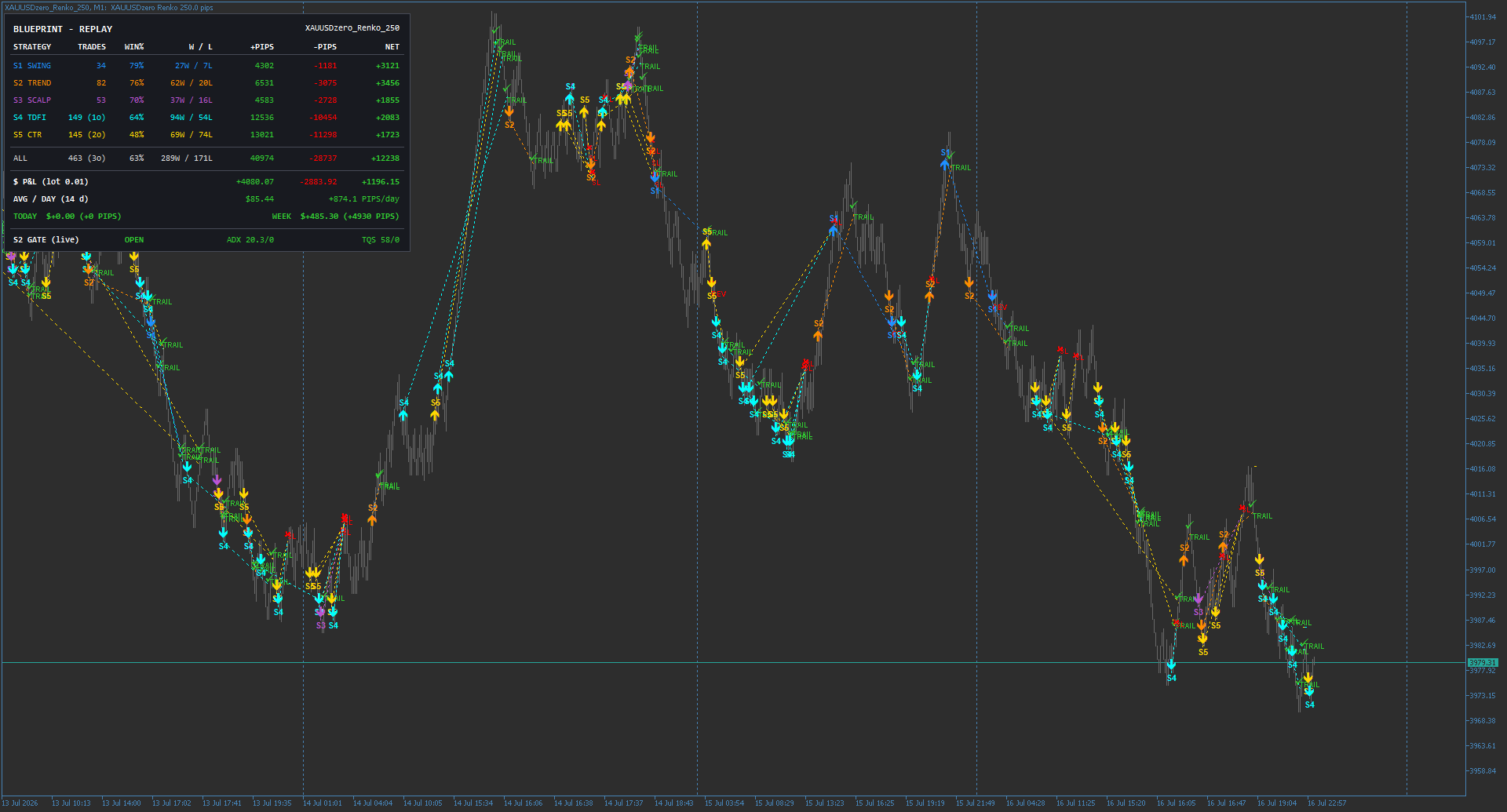
This is Blueprint running all five strategies at once over 14 days of gold. Each strategy draws in its own colour, so you can read the whole book at a glance — every arrow is an entry, and the label where its dotted path ends tells you how it left the trade.

S1 · SwingLarger held moves34 trades · 79% win · 27W / 7L+3,121
S2 · TrendFollows direction82 trades · 76% win · 62W / 20L+3,456
S3 · ScalpFast, frequent53 trades · 70% win · 37W / 16L+1,855
S4 · TDFIMomentum149 trades · 64% win · 94W / 54L+2,083
S5 · CTRFades extremes145 trades · 48% win · 69W / 74L+1,723
All strategies · 463 trades · 63% win +12,238 pips

Follow any single trade on the chart: a coloured arrow marks the entry, a dotted line of the same colour tracks it, and the tag at the end says how it exited

↑ / ↓ Entry (long / short) TRAIL — trailing stop took profit SL — stop-loss hit REV — reversed on opposite signal

The panel top-left is the live dashboard. It scores every strategy separately, then totals them, and converts pips to real money at the lot size you set — here the smallest, 0.01 lots.

Window

14 days

Net result

+12,238 pips

$ P&L · 0.01 lot

+$1,196 net

Average / day

+874 pips · $85

This week

+4,930 pips · $485

Win rate · all

63% 289W / 171L

Figures are from a Renko replay at 0.01 lots — a demonstration of the engine, not a promise of future results. Scale the lot size and the dollar figures scale with it.

Five strategies, one engine

Run one, run all, or mix and match — each strategy is independent, with its own settings and its own magic number.

Swing

Hold through the larger moves

Trend

Follow the prevailing direction

Scalp

Fast, small, frequent entries

Momentum

Enter on strength

Counter

Fade the extremes

What Blueprint does

01

Confluence entries

Each strategy combines several internal indicators. Switch them on or off as you like — every enabled indicator must agree before a trade is taken, so entries are only as loose or as strict as you set them.

02

Fully self-contained

Every indicator is calculated inside the product. There are no extra files to install and no external indicators to buy — the whole engine ships in one package.

03

Flexible stops and exits

Stop-loss by swing pivot, fixed points, or indicator. Trailing by R-multiple, points, or brick. A partial take-profit ladder, plus an optional reverse-on-opposite-signal.

04

Built-in risk control

Position sizing by fixed lots or by risk percent, a daily loss limit, and an optional Friday auto-close before the weekend — the guardrails are part of the system, not an add-on.

05

Telegram notifications

Trade alerts as they happen, plus daily and weekly reports delivered straight to your phone.

The companion indicator

See it before you trade it

Blueprint the indicator draws every entry and exit the EA would take across your history, marks the stop-loss line on open trades, and runs a full performance dashboard with simulated P&L in pips and dollars. Same engine as the EA — what you see on the chart is what it does.

Backtest before you run it

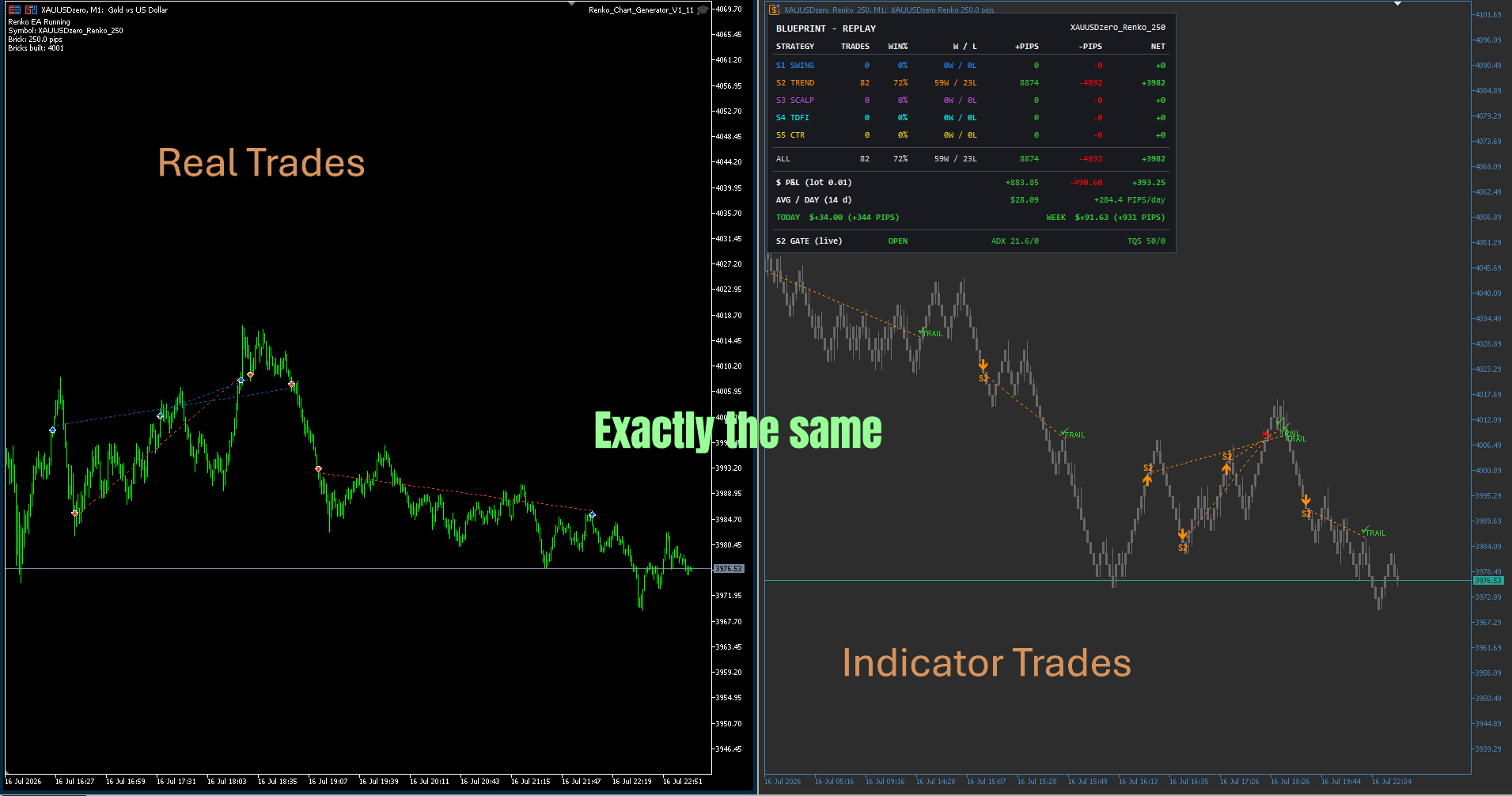
The indicator mirrors the EA, trade for trade

Run the EA and the indicator on the same XAUUSD Renko chart and they line up exactly — same entries, same exits, same closes. Study a strategy on the indicator across your history first, and you already know how the EA will behave when you switch it on.

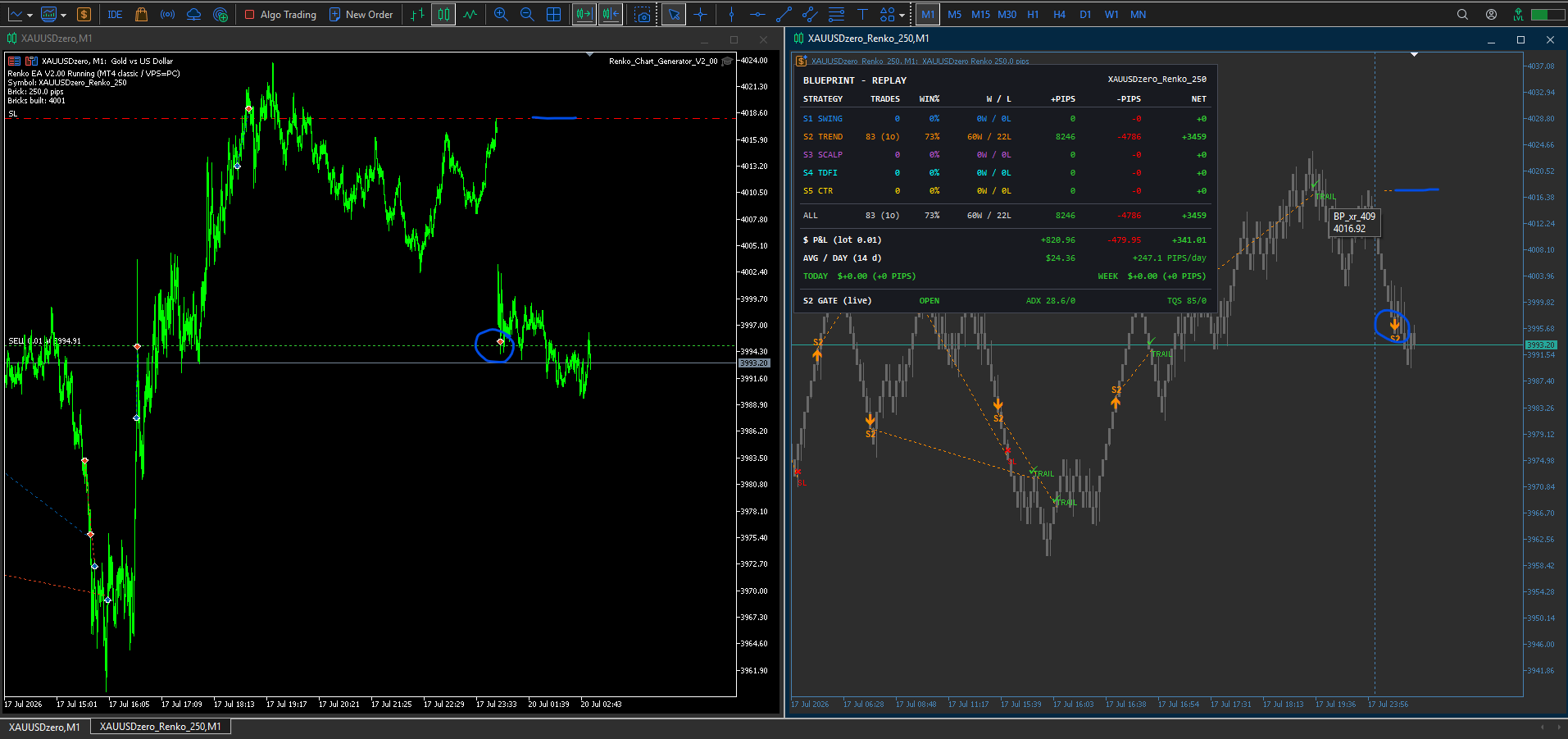
Real trades vs. indicator The live EA on the left, the Blueprint indicator on the right, same window — the entries and exits are identical. What the indicator draws is exactly what the EA does.
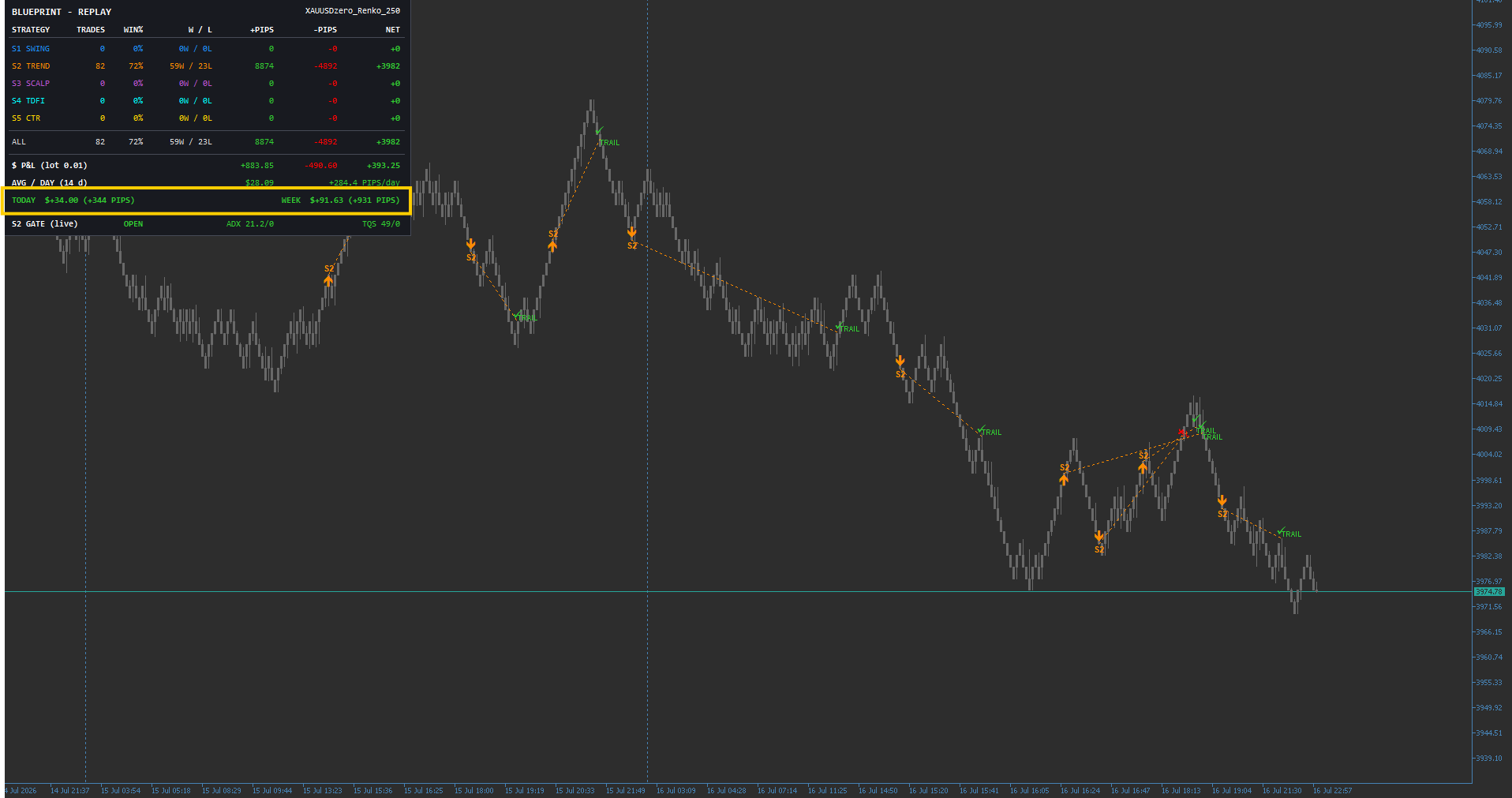
Live performance dashboard The on-chart dashboard tracks each strategy's trades, win rate and net pips, with a running P&L and a highlighted today and this-week readout in both dollars and pips — here Strategy 2 (Trend) at +931 pips on the week.
Why Renko

Same strategy, two charts — Renko wins

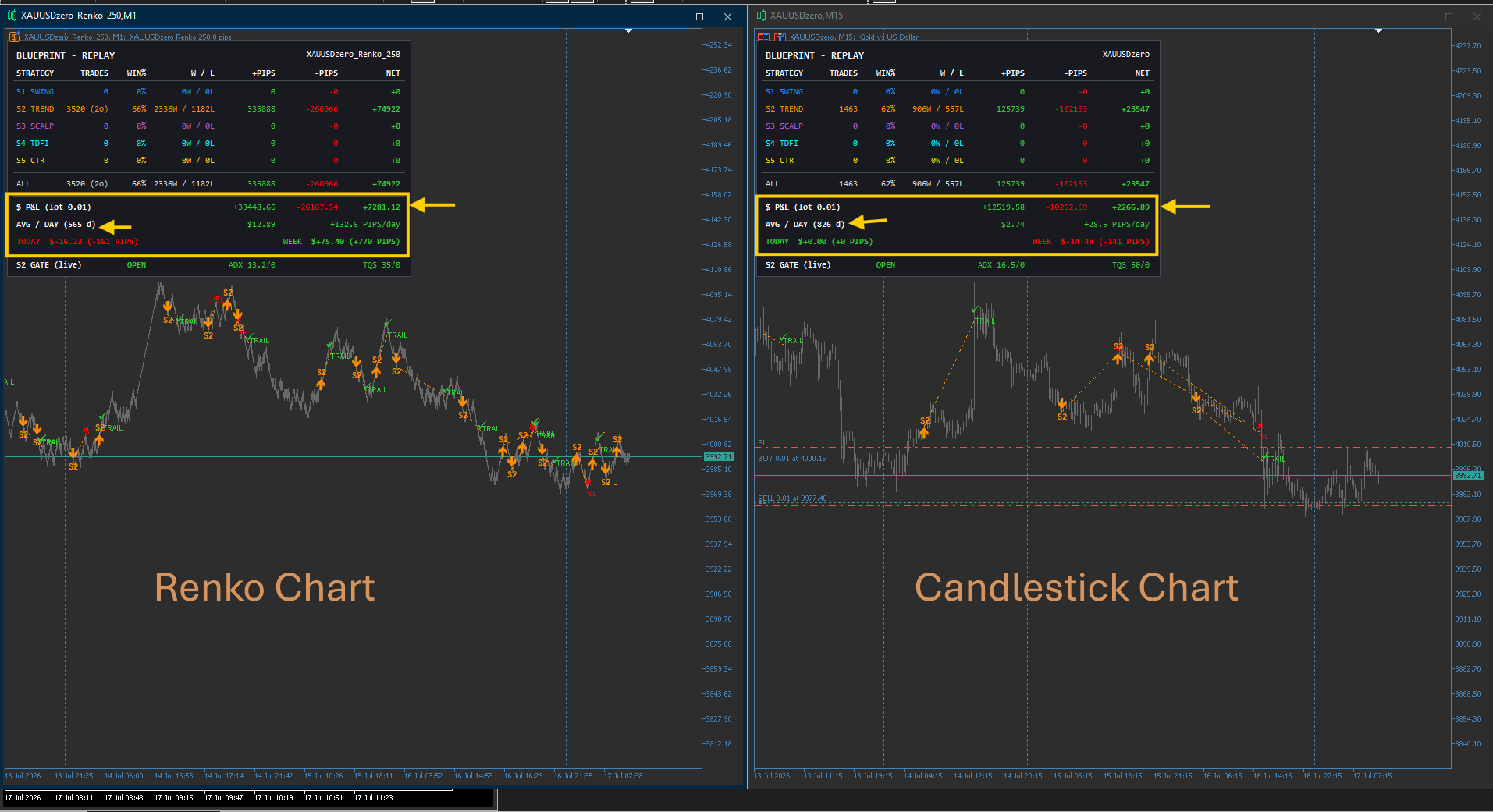
Blueprint is built for Renko. Run the exact same Strategy 2 (Trend) setup on a XAUUSD Renko chart and on a standard M15 candlestick chart over the same history and the difference is stark: Renko strips out the time-based noise that produces false signals, so the same logic takes cleaner entries and holds trends longer.

Renko (left) vs. candlestick (right) Identical Strategy 2 setup, same gold history. On Renko — 3,520 trades at 66% win, +74,922 pips ($7,281 at 0.01 lot), about +132.6 pips/day. On M15 candlesticks — 1,463 trades at 62% win, +23,547 pips ($2,267), only +28.5 pips/day.
Same S2 setupRenkoCandles
Win rate66%62%
Net pips+74,922+23,547
Pips / day+132.6+28.5
$ P&L (0.01)+$7,281+$2,267
The gap, in numbers Same code, same market — Renko delivers roughly 3× the net pips and 4.6× the pips per day. That is why every strategy in Blueprint is designed and tuned on Renko bricks, not time candles.

Mix and match

Run two or more strategies at once

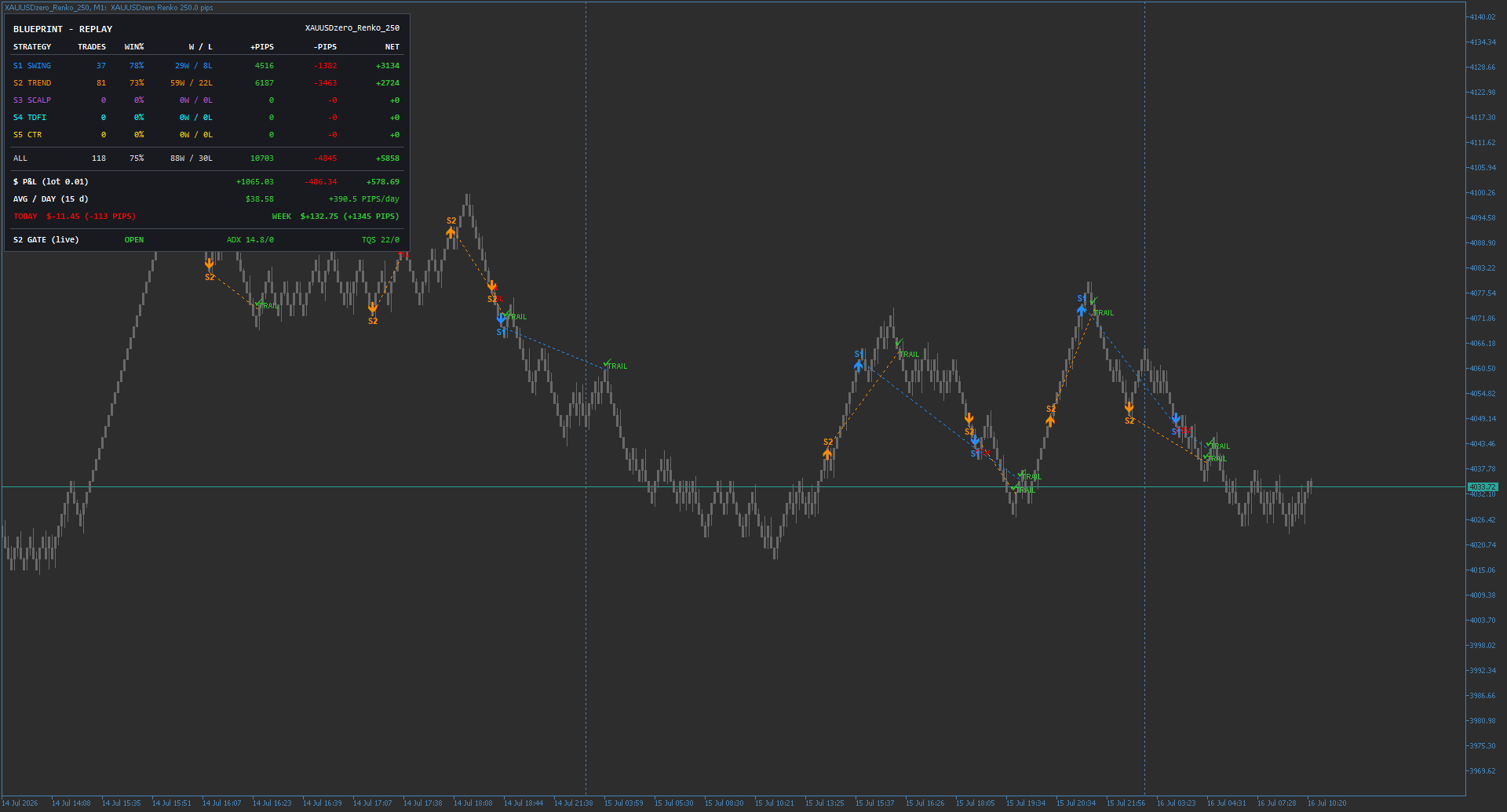
Each strategy is independent, so you can run them side by side on the same chart. Here Swing (S1, blue) and Trend (S2, orange) trade the same gold history together — the dashboard keeps a separate line for each and totals them at the bottom. Running two or more at once needs a hedging account.

Two strategies, one chart Blue arrows are Swing entries, orange are Trend — each with its own entry-to-exit path and trailing stop. They trade independently and never share a position.
Combined dashboard Swing 37 trades / 78% and Trend 81 trades / 73% add up to 118 trades at 75% win+5,858 pips (+$578.69 at 0.01 lot) over the replay, about +390 pips/day.
Confluence in practice

Change the filter, change the trades

Every strategy runs a set of internal indicators you can switch on or off — enabled ones must all agree before a trade is taken. Toggle one and the entries, the count, and the result all shift. Here is Strategy 3 (Scalp) replayed over the same gold history under two different filter sets.

The filter set Strategy 3's indicator block. Only Ind 04 is set to true here — the other three are off, so a trade needs just that one indicator to agree. The same panel governs the stop, trailing and recovery options for the strategy.
Filter 1 54 trades, 69% win rate, 37 wins / 17 losses over the replay window — +1,655 pips net, about +138 pips/day. A looser filter takes more entries.
Filter 4 Same strategy, same history, different indicator: 47 trades, 66% win rate, 31 wins / 16 losses — +1,008 pips net. Fewer, different entries and a different outcome, all visible before you commit the EA.
Set it up your way

Everything is an input

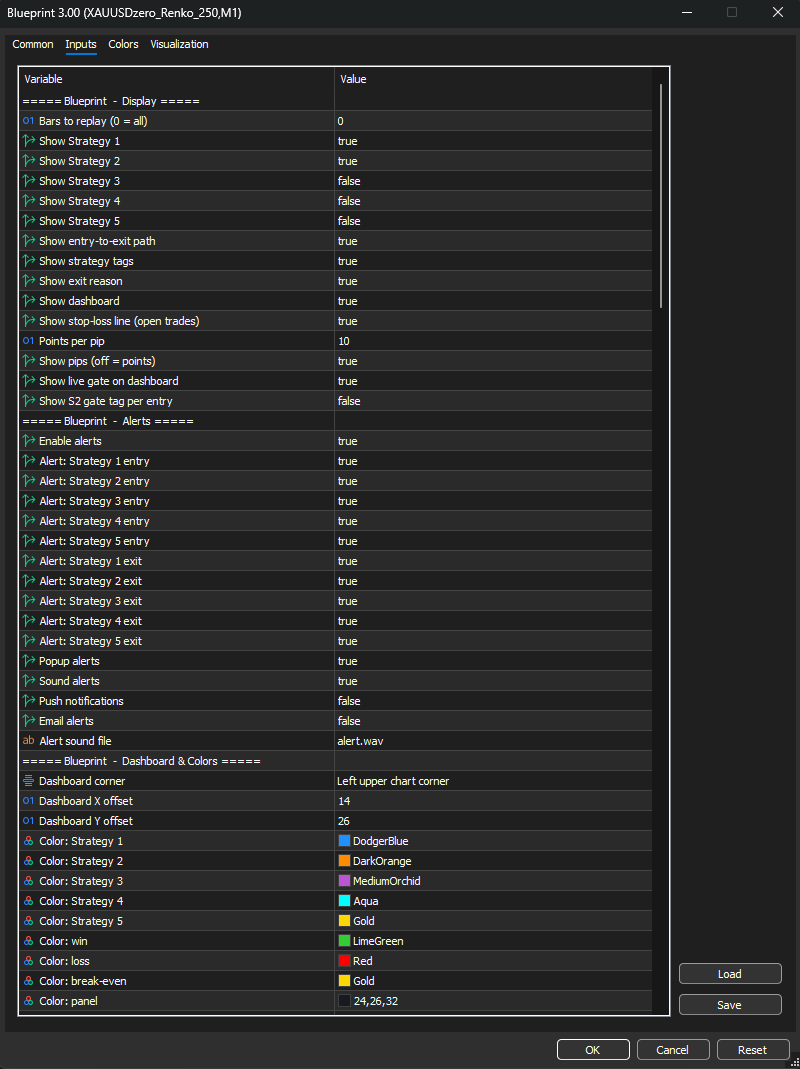
The indicator's Inputs tab groups every control so you can shape what shows, what alerts, and how it looks — nothing is hard-coded.

Display

Choose how many bars to replay (0 = all), toggle each of the five strategies on the chart, and show or hide the entry-to-exit path, strategy tags, exit reasons, the dashboard, and the stop-loss line on open trades. Report P&L in pips or points.

Alerts

Turn alerts on per strategy and per side — entry and exit independently — then pick your channels: pop-up, sound (with a custom sound file), push, or email.

Dashboard & colors

Position the dashboard in any chart corner with an X/Y offset, and set a color for each strategy plus the win, loss, break-even and panel colors — so the chart reads the way you want at a glance.

Getting started

01

Attach the indicator

Add Blueprint to your XAUUSD Renko chart — for example a “XAUUSD_Renko_250” custom symbol — to study the strategies and the dashboard visually.

02

Attach the EA

Add Blueprint EA to the same chart, set your brick size and money management, and choose which strategies to run.

03

Let it trade

Run one strategy or several and let the engine work. Running two or more strategies at once requires a hedging account.


Pricing

Pick your plan

One-time payment. No subscription. A detailed PDF user guide is included with both.

Blueprint · IndicatorSheet 01/02

Indicator

See and backtest every trade before you commit

$99one-time
  • Full Blueprint replay indicator
  • All 5 strategies drawn on your chart
  • Live performance dashboard — win%, pips & $ P&L
  • Confluence filters + entry-to-exit paths
  • Backtest visually across your full history
  • Telegram, pop-up, push & email alerts
Get the Indicator — $99
How to pay

Pay by PayPal or Binance, then send your receipt to Telegram @agouda90 or gouda9050@gmail.com — you'll get the files and the PDF guide back the same day.

PayPal QR code for Ahmed Ibrahim

PayPal

Ahmed Ibrahim

gouda9050@gmail.com

Binance Pay QR code

Binance Pay

Scan to pay

Scan in the Binance app to send payment

Questions

Before you buy

The things traders ask most — answered straight.

What do I need to run Blueprint?
MetaTrader 5 and a XAUUSD (gold) Renko chart — a custom Renko symbol such as “XAUUSD_Renko_250”. The brick size is an input, so you can match it to your own broker's feed. It works with any broker that offers gold.
What's the difference between the Indicator and the EA?
The indicator draws and replays every entry and exit across your history so you can study and backtest each strategy visually. The EA automates those same trades. Both share one engine, so the indicator shows exactly what the EA does — start with the indicator at $99, or get the complete system at $499.
Are the results guaranteed?
No. Every figure shown is from a Renko replay at 0.01 lots — a demonstration of the engine, not a promise of future performance. Trading carries real risk; test on a demo account first and only trade with capital you can afford to lose.
Can I run more than one strategy at once?
Yes. Each of the five strategies is independent, with its own settings and magic number. Run one, run all, or mix and match. Running two or more simultaneously requires a hedging account.
How do I get the files after I pay?
Pay by PayPal or Binance, then send your receipt to Telegram @agouda90 or gouda9050@gmail.com. You'll receive the files and the detailed PDF user guide the same day.
Do I get updates and support?
The complete EA + Indicator system includes free updates and priority support. Reach me any time on Telegram or by email — I build and trade these systems myself, so support comes straight from the developer.
Ahmed Ibrahim Gouda
100+
EAs & indicators delivered
5+ yrs
Building algorithms
4.8/5.0
Client rating
100%
On-time, on-budget
About

From blueprints to algorithms

I started my career as an architect, spending 10+ years turning complex visions into precise technical realities. In 2020 I discovered algorithmic trading — and code became my new blueprint.

What began as automating my own strategies on MetaTrader turned into a passion, then a profession. Over the past 5+ years I've delivered 100+ Expert Advisors and custom indicators for clients across the UK, Australia, Europe and the USA — holding a 4.8/5.0 rating and a 100% on-time, on-budget track record across MQL5, Upwork and Freelancer.

I don't just write code — I understand markets. I know what a strategy needs to survive live conditions, not just backtests. That mix of financial intuition and engineering precision is what I bring to every project.

What I build

  • Expert Advisors (EAs) for MT4 & MT5 — trend, breakout, scalping, grid, martingale and multi-engine systems
  • Custom indicators & dashboards — Smart Money Concepts (CHoCH/BOS), Renko, alerts, non-repainting logic
  • TradingView Pine Scripts
  • Strategy automation, backtesting, optimization and risk-control logic

I also develop and trade my own algorithms — including Blueprint — so I build with real skin in the game.

Work with me

Hire me for your next EA or indicator.

Custom Expert Advisors Custom indicators MT4 & MT5 Strategy automation Dashboards & GUI
★★★★★

Excellent developer! Ahmed delivered a high-quality MQL5 Expert Advisor and indicator exactly as requested. Great communication and professional service. Highly recommended.

Marco SpanoMQL5 · 2026

★★★★★

An excellent and outstanding service from this freelancer. Very efficient and proficient with the project. Highly recommended for his brilliant and friendly service.

Shaheed K.Freelancer · Martingale EA

★★★★★

Professional and cooperative developer. Delivered quality work with good communication. Responsive to feedback and completed the project successfully. Recommended.

mossadsamyMQL5 · 2026

★★★★★

Good coder. Fast and reliable.

Eduard M.Freelancer · MT4/MT5 Scalping EA

★★★★★

Amazing developer, did everything I wanted him to do — will work again with him.

59848MQL5 · 2026

★★★★★

Excellent work! Insanely fast and accurate.

jcnovoa21MQL5 · 2026